


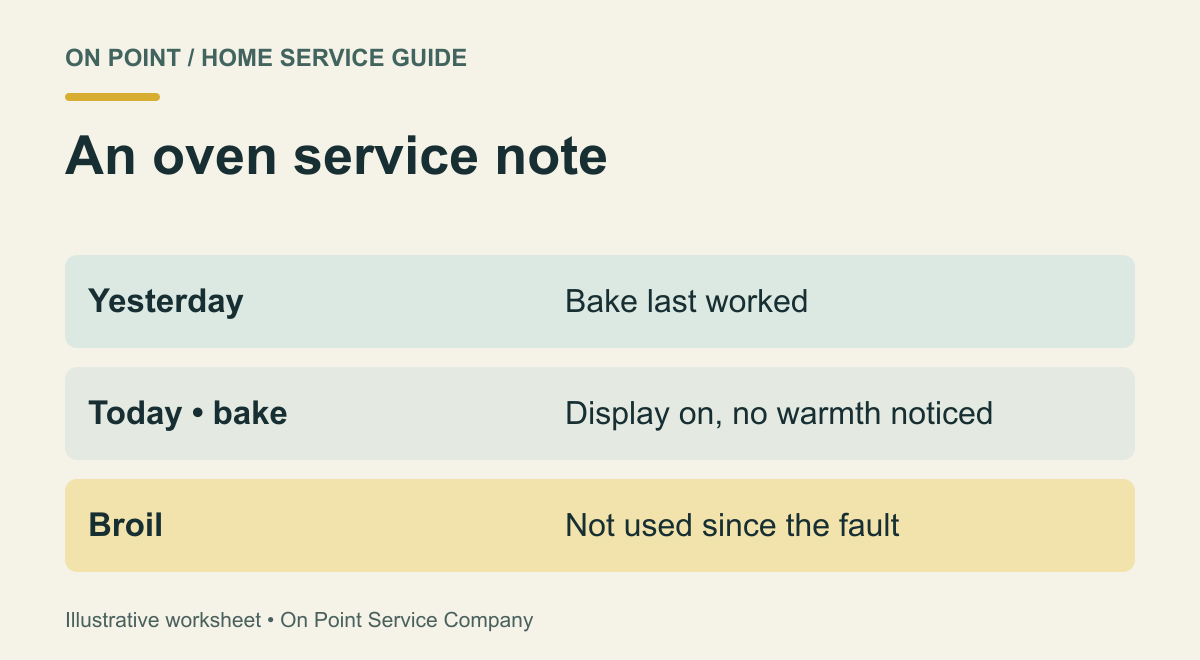
The most useful oven repair request explains what happened, what you were trying to do and when it last worked normally. You do not need to identify the failed component. A short, accurate account helps more than a long list of parts suggested online.
An oven service note
A useful message might read, “Yesterday the casserole baked normally. Today I selected bake and the display showed the setting, but the oven stayed cool during that attempt. I have not used broil since.” That last sentence matters. It keeps an unknown from turning into “broil works” on the job ticket. Attach a photo of the exact message on the display if you already have one.
| Yesterday | Bake last worked |
|---|---|
| Today • bake | Display on, no warmth noticed |
| Broil | Not used since the fault |
Turn a kitchen story into a bookable oven complaint
Picture someone calling from work about the oven at home. Their partner saw the display light up, a guest remembers dinner taking longer, and nobody remembers the mode. Start by separating the firsthand account from the secondhand one. Ask the person who used the appliance for the mode, displayed target, approximate start time and the point when they stopped using it. Record “unknown” for anything neither person saw. A clear gap in the description is easier to investigate than a guessed fact on a job ticket.
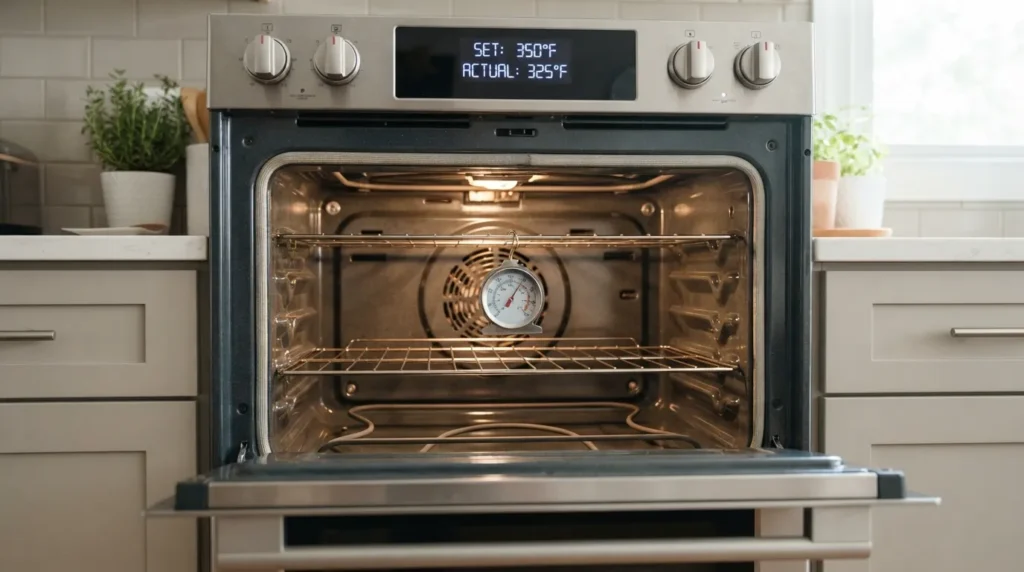
For a double oven, name the upper or lower cavity in the first sentence. If the cooktop shares the appliance, say whether anyone actually used it after the problem began. End the message with what you need confirmed: whether the first visit is diagnostic, who may approve further work, and which person will be available to show the original symptom or photo.
Describe what works as well as what fails
Note whether the display responds and which functions you have already used. For example, “The display comes on; bake did not warm during the attempt I made yesterday” is clearer than “the whole oven is dead.” Do not run extra modes to investigate an unsafe appliance. Report only observations you already have or can make safely during normal operation.
For the broader issue, see Oven Maintenance Before Thanksgiving: Run This Test Now, Not on the 25th.
Find the identification without pulling the appliance out
Look for the model information in your purchase records, the owner's manual or an accessible label identified by the manufacturer. GE's product support pages, for example, direct owners to model-specific resources. Do not move a heavy built-in oven or reach near hot parts to obtain a number. Tell the repair company if the label is inaccessible.
Send context that might otherwise be missed
Mention whether the issue began after a power interruption, cleaning, moving the appliance or a change in settings. Include any displayed error exactly as written; a photograph is useful if it is safe to take. Keep the serial number out of public posts, but provide it privately to the service company when needed for identification.
For a companion worksheet, see Oven Trouble Before a Holiday: Build a Repair and Backup Plan.
Finish with appointment questions
Ask what diagnostic or visit charges apply, whether any amount is credited toward an authorized repair, and how approval for additional work is handled. These are questions to confirm, not a statement of On Point's fee policy. If a holiday deadline matters, explain it and ask what can realistically be confirmed now.
An oven service note worksheet
- Appliance
- Brand, model and fuel/type if known
- Symptom
- What happened, in plain language
- Settings
- Mode and temperature selected
- Timing
- First noticed / last normal use
- Evidence
- Error text, safe photo and recent changes
What a complete intake message sounds like
“The upper cavity last baked normally on Saturday. On Monday the display accepted bake, but the food remained cold. The lower cavity has not been used since. The model is on the receipt I can send privately. Please let me know whether the visit is for diagnosis, who approves a repair, and how the appointment time will be confirmed.” This gives the person answering the phone facts they can pass along without editing a guessed part name.
Frequently asked questions
Should I order a part before the technician comes?
A symptom alone does not establish which part is needed. Ask the service company before ordering; confirm identification, compatibility and return conditions if a part is recommended.
Should I send the temperature I selected or the temperature I measured?
Label each separately. A setpoint of 350°F says what you asked the oven to do. A reading needs its time, instrument and location to be interpretable.
What if the oven is part of a combination unit?
Say which cavity failed and whether the other cavity, display and cooktop were used normally at the time. A wall-oven and microwave combination may have separate controls or model records. Send a wide photo of the complete unit along with the display message so the job is booked against the correct appliance.
For help with this equipment, see On Point’s stove and oven repair service.
References
- GE Appliances: locating model-specific support
- GE Appliances model-specific manuals — For GE equipment, enter the complete model number to find its use, care and installation instructions. For another brand, use its equivalent manual.
- GE Appliances model and serial number locations — The rating-plate location depends on the appliance. This guide helps GE owners find it.